Sign in to your subscription
New phone or computer? Enter the email you paid with and we'll send a one-time sign-in link. No password.
For shops, salons and crews on paper timecards
Snap the timecards. Get the weekly hours.
Take a photo of each paper timecard or sign-in sheet. CardTotals adds up regular and overtime hours for each person, highlights anything it wasn't sure about, and lets you copy the totals into payroll.
Free: 5 photos, no account needed. After that it's $9/month.
Overtime rules over 40 hrs/week
Overtime rules differ by state. These settings only change the math; they don't tell you which rule applies to you.
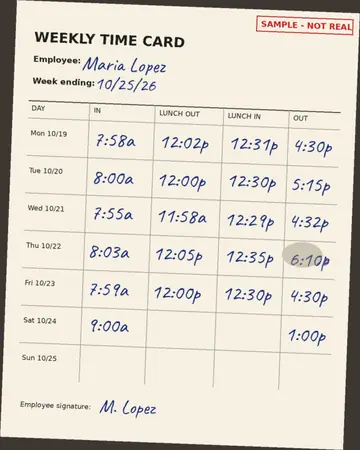
Maria Lopez week of Oct 19
| Day | In | Out | Hours |
|---|---|---|---|
| Mon | 7:58a | 4:30p | 8:03 |
| Tue | 8:00a | 5:15p | 8:45 |
| Wed | 7:55a | 4:32p | 8:06 |
| Thu | 8:03a | 6:10pChecked | 9:37 |
| Fri | 7:59a | 4:30p | 8:01 |
| Sat | 9:00a | 1:00p | 4:00 |
- Regular
- 40.00
- Overtime
- 6.53
- Total
- 46.53
Weekly hours
Every punch tap any cell to fix it
You've used your 5 free photos
Keep adding up timecards every week for $9/month.
- Up to 200 photos a month
- Sign in on any phone or computer with your email
- Cancel anytime from your Stripe receipt email
Your edits and the table above stay on this page either way.
How it works
Snap
Photograph the week's cards with your phone. Handwritten or punch-clock, 12- or 24-hour, one person per card or a sign-in sheet.
Check
Cells highlighted in yellow are the ones we weren't sure about, plus any missing punches. Tap to fix; the totals update as you type.
Copy
Paste each person's regular and overtime hours into payroll, or download a CSV with every punch.
Handles lunch punches, unpaid breaks, shifts past midnight and split shifts. Hours are added up to the minute by plain arithmetic, not guessed by AI.
Simple pricing
Free
$0
- 5 photos to try it
- No account, no email
- Everything included: overtime rules, flags, Copy and CSV
Monthly
$9/month
- Up to 200 photos a month (resets on the 1st)
- Sign in on any device with your email
- Cancel anytime; paid through Stripe
Questions
How accurate is it?
It reads handwriting with an AI vision model, and it can misread a messy or smudged time. Anything it wasn't sure about, plus any missing punch, is highlighted in yellow so you can check it against the card. The math after that (lunches, breaks, overnight shifts, overtime) is plain arithmetic, not AI. Always look over the highlighted cells before you pay anyone.
What happens to my photos?
Your photos are sent over an encrypted connection to our server and to Cloudflare Workers AI, which reads the times. We don't save the photos. Cloudflare says it doesn't keep Workers AI inputs after the request is done and doesn't use them to train models. The table of names and times is kept in your browser tab only; we don't store it. Details are in the privacy policy.
What kinds of timecards work?
Handwritten cards, punch-clock cards and sign-in sheets with several people, in 12- or 24-hour time. Flat, well-lit photos taken from straight above work best. Upload one pay week at a time so weekly overtime adds up correctly.
Which overtime rules does it use?
Weekly overtime after 40 hours by default. You can change the number, add daily overtime (for example after 8 hours a day) and pick the day your workweek starts. CardTotals does the math; it doesn't decide which rules apply to your business.
Can I cancel anytime?
Yes. Use the link in your Stripe receipt email to cancel. You keep access until the end of the month you've paid for, and you won't be charged again.
Do I need an account?
Not for the 5 free photos. When you subscribe, the email you give Stripe becomes your sign-in. On a new device, enter it and we'll email you a one-time link. There's no password.
Is this payroll or tax software?
No. CardTotals adds up hours. It doesn't pay anyone, file taxes or give legal advice. Check your state's overtime rules and the highlighted cells before running payroll.